RSA Request Signing
Cashonrails uses RSA digital signatures to authenticate payout requests. Generate an RSA key pair, upload your public key to the merchant dashboard, then sign the exact request body with your private key before sending payout API requests.
Step 1: Generate a Private Key
Generate a 2048-bit RSA private key:
openssl genrsa -out private.pem 2048This creates a private key file named private.pem. Keep this file secret and do not share it.
Example private key format:
-----BEGIN RSA PRIVATE KEY-----
MIIEowIBAAKCAQEA...
...
-----END RSA PRIVATE KEY-----
Step 2: Generate the Public Key
Generate a public key from the private key:
openssl rsa -in private.pem -pubout -out public.pemThis creates a public key file named public.pem.
Example public key format:
-----BEGIN PUBLIC KEY-----
MIIBIjANBgkqhkiG9w0BAQEFAAOCAQ8AMIIBCgKCAQE...
...
-----END PUBLIC KEY-----
Step 3: Paste the Public Key
Paste the contents of public.pem in the API Keys and Webhook section of your Cashonrails merchant dashboard.
Open API Keys and Webhook , or go to Settings and click the API Keys and Webhook tab. In the RSA PEM Key section, paste the full public key value, then click Update RSA Key.
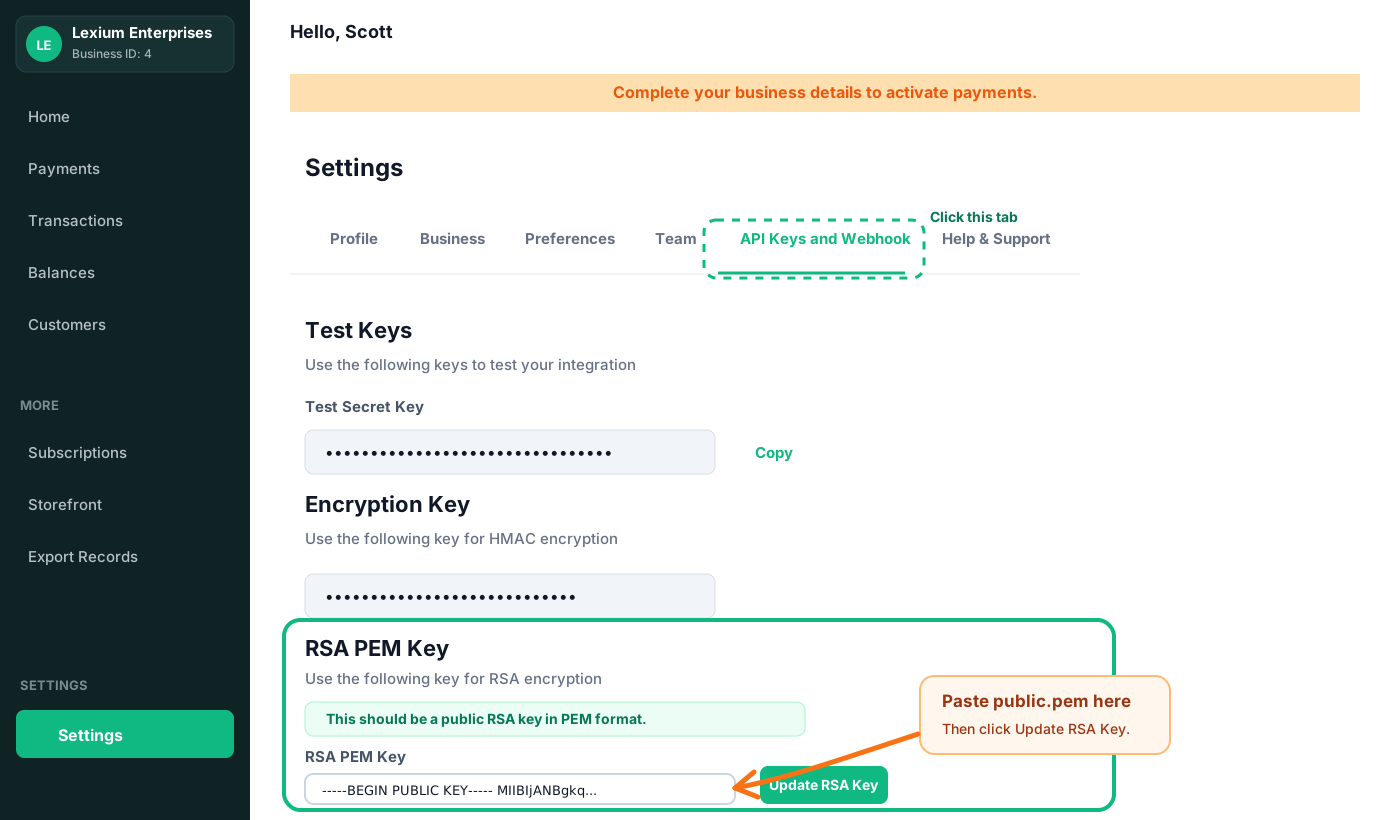
Example public key value:
-----BEGIN PUBLIC KEY-----MIIBIjANBgkqh...-----END PUBLIC KEY-----Cashonrails stores the public key and uses it to verify your request signatures.
Step 4: Sign Payout API Requests
Before sending a payout request, sign the exact JSON request body using your private key and SHA-256. Base64-encode the signature and send it in the X-Signature header.
PHP
<?php

$payload = json_encode([
    'account_number' => '0123456789',
    'account_name' => 'John Doe',
    'bank_code' => '000013',
    'amount' => '100',
    'currency' => 'NGN',
    'sender_name' => 'Jane Smith',
    'narration' => 'Payment for services',
    'reference' => 'ngn_ref_123'
]);

openssl_sign(
    $payload,
    $signature,
    file_get_contents('private.pem'),
    OPENSSL_ALGO_SHA256
);

$signature = base64_encode($signature);The payload string you sign must match the request body you send byte-for-byte, including field order, whitespace, and casing. For the example above, that string is exactly:
{"account_number":"0123456789","account_name":"John Doe","bank_code":"000013","amount":"100","currency":"NGN","sender_name":"Jane Smith","narration":"Payment for services","reference":"ngn_ref_123"}No spaces between keys and values, no line breaks, and the fields in this exact order. If your language’s JSON serializer reorders keys or adds whitespace by default, sign the same compact string above rather than whatever the serializer produces, then send that same string as your request body.
Send the generated signature with your request:
X-Signature: <base64-signature>
Content-Type: application/json
Verify Key Pair (Optional)
You can verify that your private and public keys belong together:
openssl rsa -in private.pem -pubout -outform PEM | diff - public.pemIf no output is returned, the keys match.
Security Requirements
- Never share your private key.
- Never commit your private key to source control.
- Store the private key securely.
- Generate a new key pair immediately if you suspect the private key has been exposed.